
|
|
Creating Boot Floopy |
Boot floppy InstructionsTo create a boot floppy, you will need another computer having windows operating system. Follow the following steps from a friends computer. |
|
1. From any computer
access control panel as show below
|

|
2. Click on "Add/Remove
Program " in control
panel as shown below
|

|
3. You will get the screen
shown below, on this click on "Startup
Disk"
|

|
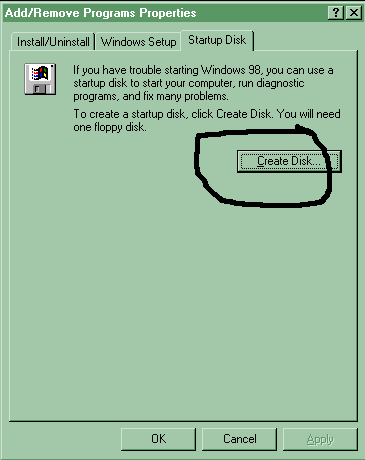
4. Now you will get the
window shown below
|
|
5. In this window click
on "Create Disk"
after putting an empty floppy in the floppy disk drive
|

WOW!!!That sure was easy right ?Ok so now you are ready to boot on any machine from your floppy. |
|
6. Just one more thing.
Copy the file "AUTOEXEC.BAT" provided
here into your Boot Floppy ( E.g A:/ )for instructions if you are in need
of help. This step is not necessary if you plan to do it without any support.
Just copy this file into your boot floppy after the above steps are completed.
|